Client Security offers hardening options for administrators to further lock down the client application. While the system remains secure without these options, there are often requirements or scenarios where admins would like to extend the standard security apparatus already in place.
Tip: If you want to secure the server-side options, see Server-Side Security.
Note: Default settings are applied when a new instance is installed. When upgrading an existing installation, your own settings will be preserved.
Accessing Client Security Configuration
Access this page in the Admin Console by selecting Security > Client Security in the left-hand menu:
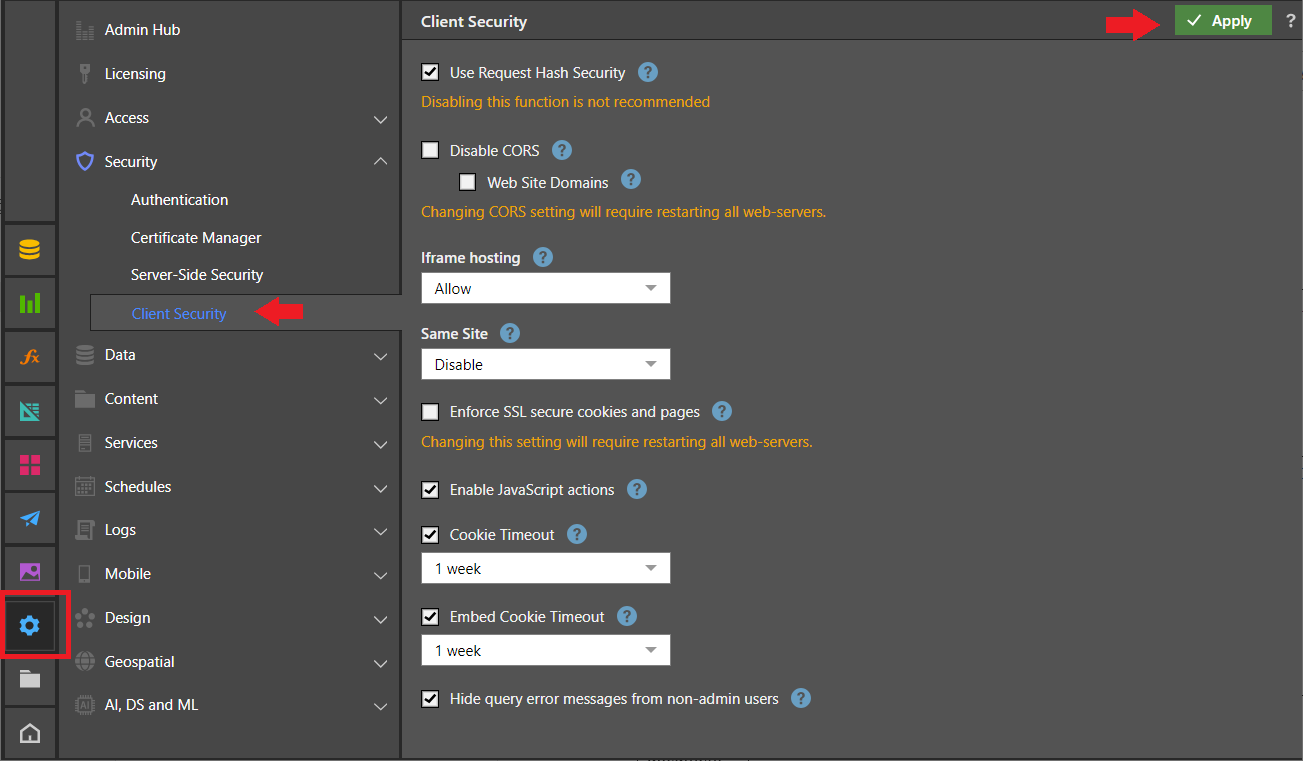
Important: Always remember to apply any changes using the Apply button at the top-right of the workspace and restart your web servers where necessary.
Client Security Configuration Options
The Client Security settings impact the way the HTML clients and cookies are handled and secured:
Use Request Hash Security
Add a hash check to key client-side functions. This ensures that only authorized users are performing authorized activities on relevant content.
Pyramid recommends that you keep this checkbox selected.
Default: Enabled.
Disable CORS
Cross-origin resource sharing (CORS) allows restricted resources on a web page to be requested from a domain outside of the domain from which the first resource was served. This capability is needed in Pyramid when using the embedding capabilities. An admin can choose to Disable Cross-origin resource sharing (CORS) and prevent Pyramid from accepting requests from other domains.
Default: Disabled.
Note: If this option is enabled, embedding capabilities are disabled.
Web Site Domains
If CORS is enabled, a whitelist of web domains should be provided that can be used for cross-domain access. This prevents degradation in client security. The whitelist is a comma-separated list of site domains. All entries in the list must include the relevant protocol.
Iframe hosting
Set iframe hosting to one of the following options:
- Allow: Enables iframe hosting. Iframes are commonly used for advertisements, embedded videos, web analytics, and interactive content.
- Deny (default): Blocks all iframe hosting. If iframe hosting is blocked, iframe embedding capabilities are disabled.
- Same Origin: Allow iframes hosted in the same website domain as Pyramid only.
Same Site
Stop the browser from sending cookies along with cross-site requests. The goal is to lower the risk of a cross-origin information leak, and to offer some protection against cross-site forgery attacks. The options are as follows:
- Disable: Allows cookies to be sent.
- Lax (default): Cookies are sent with GET requests or top-level navigation with a safe HTTP method.
- Strict: Stops cookies being sent by the browser to the target site in all cross-site browsing contexts, including when following a regular link.
Cross-Origin Resource Policy (CORP)
Your Cross-Origin Resource Policy (CORP) setting mitigates security vulnerabilities by restricting how resources (such as images, scripts, and stylesheets) can be loaded from other websites. It works by instructing the browser to enforce these rules when another site tries to load your resource:
- Same Site: Only allows requests from the same site (including subdomains), as defined by CORS site-level matching.
- Same Origin: Only allows requests that have the same origin (protocol, host, port) to load the resource.
- Cross Origin: Allows requests from any origin, essentially disabling CORP for that resource.
Note: When a browser tries to load your resource from another site, it checks the CORP header. If the request doesn’t meet the policy (for example, it comes from a different origin but the policy is Same Origin), the browser will block the resource or strip its contents. This prevents attackers from accessing sensitive data through techniques like Spectre or XS-Leaks.
Enforce SSL secure cookies and pages
Ensure all cookies are flagged for operation with SSL encrypted websites (HTTPS) only. When this option is selected, the application is blocked from operating with plain HTTP.
Enable JavaScript actions
Allow users to configure JavaScript actions, as defined in Discover or Present, to execute a script in the browser. This could provide a security risk.
This option must be enabled to configure JavaScript actions that have been defined in Discover or Present to execute a script in the browser.
Timeout Settings
Each timeout option includes an Enable checkbox and a dropdown list for selecting the timeout duration:
Cookie Timeout
Enforce cookie expiration with the ability to set the cookie timeout period. This ensures users must login to the application again when a cookie is marked as expired.
Set the timeout period to a value between 30 minutes and 12 months.
Idle Cookie Timeout
The length of time a session cookie remains valid while the user is inactive. A user is considered inactive when they are not making any requests to the server when using the Full Client or Viewer. Once the timeout limit is reached, the cookie expires and the user is logged out. To continue working, the user must log in again using their standard process.
Default: Enabled, with a default duration of one day.
Set the timeout period to a value between 5 minutes and 1 day.
Embed Cookie Timeout
Note: This option is only relevant if you are using embedded content.
Forces
the embedded token to expire. In
this scenario, you can use the pyramid.authFailure API to implement the
behavior of this function. For example, you may want to redirect users to the
Pyramid login page or show them a message. This requires users to log in to
the application again when an embedded token is marked as expired.
Set the timeout period to a value between 30 minutes and 12 months.
Hide all error message details from non-admin users
Hides any query-related errors and error details from non-admin users. When an error is encountered, non-admin users see a simplified error message and administrators see full details of the error through the System Log.
Default: Enabled.